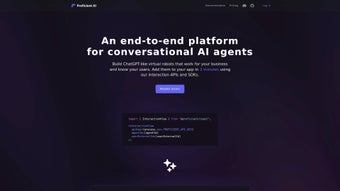

Download ProficientAI – Build Custom AI Chatbots for Business, Free & Secure
Overview & Core Capabilities
ProficientAI is a cloud‑native, web‑based platform that enables businesses of any size to design, train, test, and deploy intelligent conversational agents without writing a single line of code. Built on the latest large language model technology, the service offers a visual drag‑and‑drop builder that abstracts away the complexities of natural language processing while still providing deep customization options for power users. The platform’s admin console acts as a single pane of glass where you can monitor real‑time analytics, adjust intent confidence thresholds, and manage version control across multiple team members. Because all processing happens on ProficientAI’s secure servers, users benefit from automatic model updates, built‑in GDPR and CCPA compliance, and end‑to‑end encryption for every data transaction. Whether you need a customer‑support bot, a lead‑generation assistant, or an internal knowledge‑base agent, ProficientAI scales effortlessly from a handful of daily interactions to millions of concurrent sessions.
Key Feature Highlights
- Visual Bot Builder: Create conversation flows with a simple drag‑and‑drop canvas, eliminating the need for programming expertise.
- Multi‑Channel Publishing: Deploy bots instantly to websites, Facebook Messenger, WhatsApp, Slack, and native mobile apps for Android and iOS.
- Rich API & SDK Suite: RESTful APIs, JavaScript SDK, and native libraries for Java, Python, .NET, Kotlin, and Swift enable deep integration with existing systems.
- Customizable NLP Engine: Fine‑tune language models using domain‑specific datasets, add custom entities, and control response logic.
- Real‑Time Analytics Dashboard: Track user sentiment, conversation drop‑off points, and latency metrics to continuously improve performance.
- Enterprise‑Grade Security: TLS 1.2+ encryption, role‑based access control, and GDPR/CCPA compliance protect sensitive data.
- Collaboration & Versioning: Team members can co‑author bots, review changes, and roll back to previous versions with a single click.
- Extensive Documentation & Community Support: Detailed guides, code samples, a public GitHub repository, and an active Discord server help users solve problems quickly.
- Free Private Beta Access: Unlimited bot creation and API usage at no cost while the platform remains in private beta.
Step‑by‑Step Installation & Usage Guide
1. Account Creation and Dashboard Access
Navigate to the ProficientAI homepage and click the “Join Beta” button. After confirming your email address, you are granted immediate access to the cloud‑hosted admin dashboard. Because the solution is SaaS‑based, there is no software to download or install locally; any modern browser on Windows, macOS, Linux, or mobile devices can be used.
2. Building Your First Conversational Agent
From the dashboard, select “Create New Agent.” The onboarding wizard asks for a bot name, primary language, and optionally a CSV file containing FAQ pairs. Using the visual canvas, you can add intents, define utterances, and attach rich media such as images, buttons, or quick replies. Each node can be annotated with confidence scores, fallback responses, and conditional branching logic, allowing you to design sophisticated conversational pathways without code.
3. Training, Testing, and Iteration
Once the intents are configured, click “Train Model.” The platform queues the training job on its backend cluster and typically finishes within minutes for most datasets. A built‑in test console lets you simulate user queries and view the bot’s response in real time. For deeper validation, enable “Live Preview” to embed a temporary widget on any web page and observe live interactions from colleagues.
4. Multi‑Channel Deployment
When you are satisfied with the bot’s behavior, move to the “Deploy” tab. Here you can generate a JavaScript snippet for web integration, obtain API keys for server‑side calls, or download native SDKs for Android (Kotlin/Java) and iOS (Swift). ProficientAI automatically provisions HTTPS endpoints and handles certificate management, so you never need to touch SSL configuration.
5. Ongoing Monitoring and Optimization
The analytics panel provides daily usage statistics, error logs, sentiment analysis, and confidence alerts. Set up automated notifications for low‑confidence responses so you can quickly enrich the training data. The platform also supports A/B testing, allowing you to compare two bot versions side‑by‑side and promote the higher‑performing variant.
Compatibility, System Requirements & Integration
ProficientAI is a fully cloud‑based service, meaning it works on any operating system that supports a modern web browser (Chrome, Edge, Firefox, Safari). The platform’s SDKs are compatible with Windows 10/11, macOS 10.15+, and major Linux distributions. For mobile development, the Android SDK supports API 21 (Android 5.0) and above, while the iOS SDK requires iOS 12 or later. Because the heavy lifting occurs on ProficientAI’s servers, client‑side resource consumption is minimal, making the solution suitable for low‑powered devices and corporate environments with strict IT policies.
When integrating via API, an active internet connection with TLS 1.2+ is required. The REST endpoints accept JSON payloads and return standard HTTP status codes, ensuring seamless interoperability with backend systems built in Java, Node.js, Python, PHP, or Ruby. For developers who prefer containerized environments, ProficientAI’s roadmap includes a Docker image that can be deployed on any platform supporting Docker Engine 20.10+ for future on‑premises or hybrid scenarios.
Additional integration points include webhooks for real‑time event streaming, OAuth 2.0 for secure authentication, and webhook‑based callbacks for custom business logic. The platform also offers pre‑built connectors for popular CRM and help‑desk solutions such as Salesforce, HubSpot, Zoho, and Zendesk, enabling you to route conversational data directly into existing pipelines without additional coding.
Pros, Cons & Frequently Asked Questions
Pros
- Intuitive visual builder drastically reduces time‑to‑market.
- Broad multi‑channel support (web, mobile, messaging apps).
- Comprehensive API and SDK ecosystem for deep integration.
- Real‑time analytics and A/B testing empower continuous improvement.
- Free private beta with unlimited bots and API calls.
- Robust security (TLS encryption, GDPR/CCPA compliance, role‑based access).
- Active community on Discord and open‑source resources on GitHub.
Cons
- Currently limited to private beta; public release timeline is not fixed.
- Advanced customization (e.g., custom model training) may require technical expertise.
- Performance depends on stable internet connectivity due to cloud architecture.
- No on‑premises deployment option yet for highly regulated industries.
Frequently Asked Questions
Is ProficientAI really free during the beta?
Yes. All users invited to the private beta receive unlimited access to bot creation, training, and API calls at no cost. When the product leaves beta, a tiered pricing model will be introduced.
Can I integrate ProficientAI with my existing CRM?
Absolutely. ProficientAI provides RESTful endpoints and webhook support that can be called from any CRM that supports HTTP requests, such as Salesforce, HubSpot, or Zoho. Sample code snippets are included in the documentation.
What languages does the chatbot support?
The platform currently supports English, Spanish, French, German, and Mandarin out of the box. Additional languages can be added via custom training data, and a multilingual model roadmap is in development.
How secure is the data I send to ProficientAI?
All traffic between your application and ProficientAI is encrypted with TLS 1.2+. Data at rest is stored in encrypted databases, and the platform complies with GDPR and CCPA regulations. Role‑based access control lets you limit who can view or edit bot configurations.
Do I need any coding skills to get started?
No. The drag‑and‑drop builder lets you create conversational flows without writing code. However, if you want to embed the bot into custom applications, the provided SDKs and API documentation make that process straightforward for developers.
Conclusion & Call to Action
ProficientAI delivers a powerful, yet user‑friendly environment for businesses that want to harness conversational AI without the overhead of building a solution from scratch. Its combination of a visual bot designer, extensive integration options, real‑time analytics, and strong security posture positions it as a compelling alternative to heavyweight enterprise platforms. While the private‑beta status means you’ll be among the early adopters shaping the roadmap, the free access and vibrant community lower the entry barrier dramatically. If you’re ready to modernize your customer support, lead generation, or internal knowledge base, sign up for the ProficientAI beta today and start building smarter conversations that drive engagement and revenue.
Pros: Easy visual builder, multi‑channel support, free beta, strong security, active community.
Cons: Beta limitations, no on‑premise option yet, requires internet connectivity.



.png)



